


Email attachments automatically converted to links
Large attachments may automatically be converted to links that appear in the body of your email
Your administrator may have configured Workshare to automatically convert large attachments to links. This enables you to transfer large files without using up the space your mailbox.
As soon as you attach one or more large files, they are automatically converted to links that appear in the body of your email.
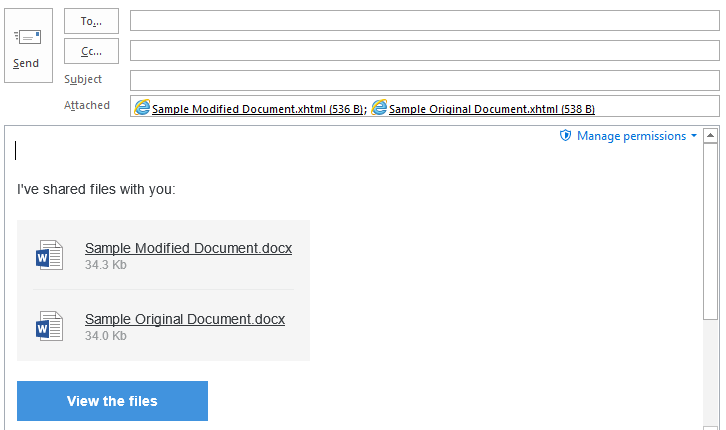 Note: If required, click Manage Permissions in the attachments bar and change the permissions set for your files, such as whether recipients can download the files.
The attachments are uploaded into a single folder in your Sent folder in Workshare and in the recipients’ Received folder in Workshare. The name of the folder is whatever you enter in the Subject field of your email.
The folder is created as soon as the attachments are converted to links and if you look in Workshare before you click Send, you will see the folder and the names of the files with upload pending.
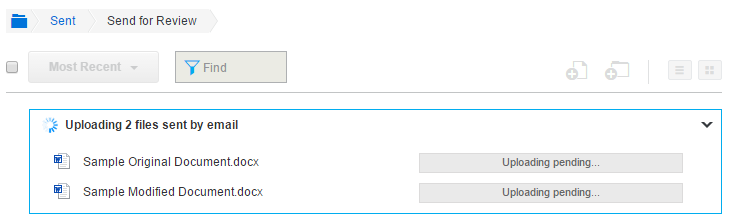
Once your email is sent, the files are uploaded to Workshare. The recipients will receive your email straight away and they can click the file names or the View the files button to view the files in Workshare. If the files are still uploading, upload pending is displayed.
As soon as you attach one or more large files, they are automatically converted to links that appear in the body of your email.
The attachments are uploaded into a single folder in your Sent folder in Workshare and in the recipients’ Received folder in Workshare. The name of the folder is whatever you enter in the Subject field of your email.
The folder is created as soon as the attachments are converted to links and if you look in Workshare before you click Send, you will see the folder and the names of the files with upload pending.
Once your email is sent, the files are uploaded to Workshare. The recipients will receive your email straight away and they can click the file names or the View the files button to view the files in Workshare. If the files are still uploading, upload pending is displayed.
Environments
Workshare Products
Workshare 9